


的NeoForge1.20.4Mod开发的视频,这篇教程是我边学边总结的,与其说是教程更像我的学习笔记,如有不清楚的地方,大家可以在评论区提问。在我力所能及的范围内,我都会解答的。
数据生成是一种通过编程生成JSON资源文件的方法,旨在避免手动编写这些文件繁琐且容易出错的过程。这个名称有点误导性,因为它既适用于数据也适用于材质模型资源
数据生成不是必须,可以手动写JSON文件。如果使用数据生成,那么原先的JSON文件需要删除
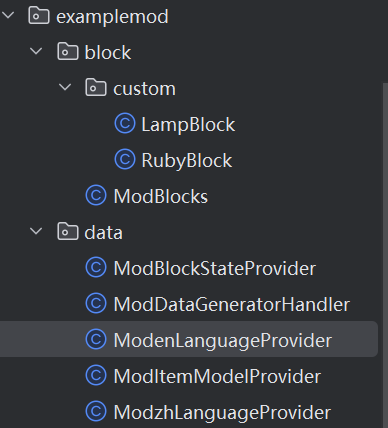
创建ModBlockStateProvider类
public class ModBlockStateProvider extends BlockStateProvider {
public ModBlockStateProvider(PackOutput output, String modid, ExistingFileHelper exFileHelper) {
super(output, modid, exFileHelper);
}
@Override
protected void registerStatesAndModels() {
this.simpleBlock(ModBlocks.RUBY_BLOCK.get(),cubeAll(ModBlocks.RUBY_BLOCK.get()));//创建方块模型
this.simpleBlockItem(ModBlocks.RUBY_BLOCK.get(),cubeAll(ModBlocks.RUBY_BLOCK.get()));//创建物品模型
this.propertyBlock(ModBlocks.LAMPBLOCK.get());
}
public void propertyBlock(Block block){
var block_off = models().cubeAll("lamp_off",new ResourceLocation(ExampleMod.MODID,ModelProvider.BLOCK_FOLDER+"/"+"lamp_off"));//创建off模型
var block_on = models().cubeAll("lamp_on",new ResourceLocation(ExampleMod.MODID, ModelProvider.BLOCK_FOLDER+"/"+"lamp_on"));//创建on模型
getVariantBuilder(block).partialState().with(LampBlock.LIGHT,true)//通过getVariantBuilder(block)来构建方块的不同状态
.modelForState().modelFile(block_on).addModel()
.partialState().with(LampBlock.LIGHT,false)
.modelForState().modelFile(block_off).addModel();
simpleBlockItem(block,block_off);//创建物品模型
}
}创建ModenLanguageProvider类
public class ModenLanguageProvider extends LanguageProvider {
public ModenLanguageProvider(PackOutput output, String modid, String locale) {
super(output, modid, locale);
}
@Override
protected void addTranslations() {
this.add(ModItems.RUBY.get(),"Ruby");
this.add(ModBlocks.RUBY_BLOCK.get(),"Ruby Block");
this.add(ModBlocks.LAMPBLOCK.get(),"Lamp");
this.add(ModItems.MAGICINGOT.get(),"Magic Ingot");
this.add("creative.example_tab","Example");
}
}如果需要中文,再新建一个这样的类,把后面的翻译改成中文就行
创建ModItemModelProvider类
public class ModItemModelProvider extends ItemModelProvider {
public ModItemModelProvider(PackOutput output, String modid, ExistingFileHelper existingFileHelper) {
super(output, modid, existingFileHelper);
}
@Override
protected void registerModels() {
this.basicItem(ModItems.RUBY.get());
this.magicIngotModel(getResourceLocation(ModItems.MAGICINGOT.get()));
}
public ResourceLocation getResourceLocation(Item item){//接收一个Item类型的参数,返回该物品的资源位置
return Objects.requireNonNull(BuiltInRegistries.ITEM.getKey(item));
}
public void magicIngotModel(ResourceLocation item){
this.getBuilder(item.toString())//通过物品的资源位置创建模型构建器
.parent(new ModelFile.UncheckedModelFile("item/generated"))
.texture("layer0",new ResourceLocation("item/iron_ingot"))
.override().predicate(new ResourceLocation(ExampleMod.MODID,"size"),16).model(new ModelFile.UncheckedModelFile("item/gold_ingot")).end();
}
}创建ModDataGeneratorHandler类
@Mod.EventBusSubscriber(modid = ExampleMod.MODID,bus = Mod.EventBusSubscriber.Bus.MOD)
public class ModDataGeneratorHandler {
@SubscribeEvent
public static void gatherData(GatherDataEvent event){
ExistingFileHelper efh = event.getExistingFileHelper();
var lp = event.getLookupProvider();
// 语言文件
event.getGenerator().addProvider(
event.includeClient(),
(DataProvider.Factory<ModzhLanguageProvider>) pOutput -> new ModzhLanguageProvider(pOutput,ExampleMod.MODID,"zh_cn")
);
event.getGenerator().addProvider(
event.includeClient(),
(DataProvider.Factory<ModenLanguageProvider>) pOutput -> new ModenLanguageProvider(pOutput,ExampleMod.MODID,"en_us")
);
// 物品模型
event.getGenerator().addProvider(
event.includeClient(),
(DataProvider.Factory<ModItemModelProvider>) pOutput -> new ModItemModelProvider(pOutput,ExampleMod.MODID,efh)
);
// 方块state
event.getGenerator().addProvider(
event.includeClient(),
(DataProvider.Factory<ModBlockStateProvider>) pOutput -> new ModBlockStateProvider(pOutput,ExampleMod.MODID,efh)
);
}
}这个类是一个数据生成器的入口点,通过监听GatherDataEvent事件,在数据生成阶段自动为模组生成所需的各种资源文件
© 版权声明
文章版权归作者所有,未经允许请勿转载。
THE END



暂无评论内容